In this blog post, we’ll explore a simple yet effective implementation of a search bar in Jetpack Compose. The provided SearchTextField composable offers a basic text field with a placeholder, suitable for building the app top bar.
Screen Shot of the Component from my Jot-app
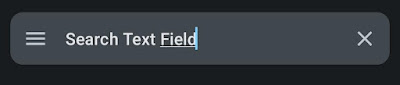
The following code can be used in your project directly and it should work as expected, the idea was to have a search bar for a top app bar which can also host the buttons on either end, do check the code below
@Composable
fun SearchTextField(
    modifier: Modifier = Modifier,
    value: TextFieldValue,
    onValueChanged: (TextFieldValue) -> Unit,
    placeholder: String,
    title: String = "",
    showTitle: Boolean = false,
    interactionSource: MutableInteractionSource,
    onSearchFocused: () -> Unit,
    focusRequester: FocusRequester
) {
    val isTextFieldFocused = interactionSource.collectIsFocusedAsState()

    BasicTextField(
        modifier = modifier
            .focusRequester(focusRequester)
            .onFocusChanged {
                if (isTextFieldFocused.value) onSearchFocused.invoke()
            },
        value = value,
        onValueChange = onValueChanged,
        textStyle = MaterialTheme.typography.titleMedium.copy(color = MaterialTheme.colorScheme.onBackground),
        singleLine = true,
        keyboardActions = KeyboardActions(onSearch = { onValueChanged.invoke(value) }),
        keyboardOptions = KeyboardOptions(
            keyboardType = KeyboardType.Ascii, imeAction = ImeAction.Search
        ),
        cursorBrush = SolidColor(MaterialTheme.colorScheme.primary),
        interactionSource = interactionSource,
        decorationBox = { content ->
            Box(
                modifier = Modifier.fillMaxSize(), contentAlignment = Alignment.CenterStart
            ) {
                AnimatedVisibility(value.text.isEmpty()) {
                    Text(
                        text = if (!isTextFieldFocused.value && showTitle) title else placeholder,
                        style = MaterialTheme.typography.titleMedium,
                        fontWeight = if (!isTextFieldFocused.value && showTitle) FontWeight.Bold else FontWeight.Normal,
                        textAlign = TextAlign.Center,
                        modifier = Modifier
                            .fillMaxWidth()
                            .offset(x = (-5).dp)// because the tf has 5dp padding for input
                    )
                }
                content()
            }
        })
}
If you have any suggestions or improvements for the code, let’s have a conversation below. Your feedback is valuable to me
Note: This article was originally published on Blogger on January 14, 2024 and imported to MangoDriod.