a team of 20+ handed over a project to our team of 5. i ended up owning all the native clients: iOS, Android, Windows by mostly bymyself. There are multiple repos, multiple languages and the hardship of understanding thier 7 year codebase.
initially the thought of this was pretty stressful, but being a good solutionist i proceeded with dicecting the issues one by one and presistent on finding a solition for them all.
The first thing is prioritizing platoforms, The stats were clear hence shared them with my manager, got iOS, Android prioritized in order and parked Windows for later as usage is extremly low. now the priority is set to the next thing.
The problem was not the workload. it was the cognitive overhead. i can barely understand my own code after a few months. here i am inheriting code from 6-7 people who clearly took shortcuts to ship fast. folder structure was a dump. files everywhere. and on top of reverse-engineering three codebases i had to track what is done, what is next, what is blocked: simultaneously, across all platforms this task alone without AI would be a real pain and would def take more than few months.
I opted to the $20 Claude subscription. so every session i was wasting the first chunk of context re-explaining the same codebase to Claude, re-orienting it to where i left off, re-answering questions it should already know. by lunch i was running out of tokens i had to use my colleague’s accounts to do whole thing again (Thanks Arun!)
out of this mess i needed a single place. one terminal. one browser tab. one AI session that already knows everything and picks up exactly where we left off, an interface for me and claude to read/update/learn about the project im working and it has to be highly structured, organized and prioritized.
so i built one. i call it the Command Center. if you have any other name to suggest, my inbox is open. this post is the full breakdown of what it is, how it works, and how you can shape it for your your own structure if you ever are in that spot, a little future pridction i think by the end of 2026 we all might have to work in this kind of set-up working on multiple projects simultaniously or atleast we will be capabble of that level of productivity.
What is this AI-Command Center
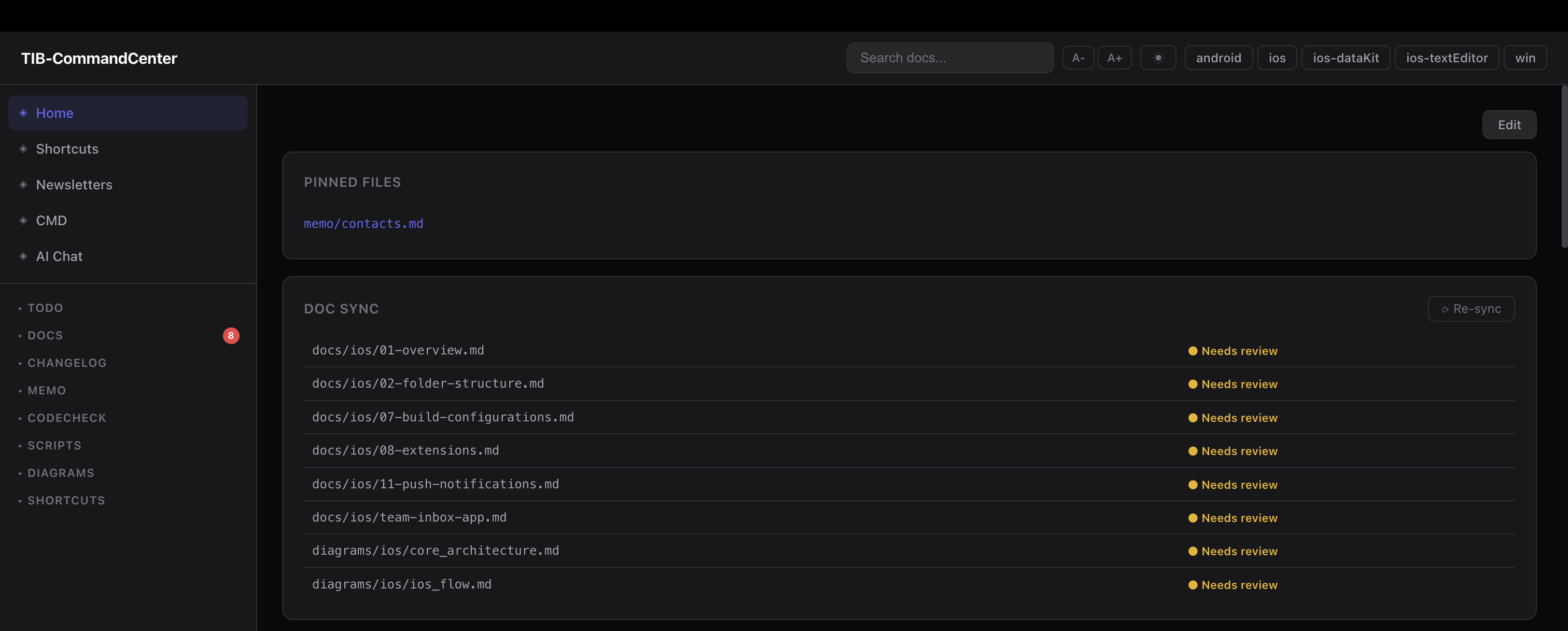
the idea is simple. instead of having our docs, tasks, changelogs in multiple apps and your terminal tabs scattered across screens for different platforms wokfing with different stages of the tasks or even totally different task altogether: and your daily runner claude-code has no means to know about all these instead you put a single shared operational layer above all your repos. not inside them. above them hence the term command center.
MyWorkspace/
├── ios/               ← own git repo, untouched
├── ios-dataKit/       ← own git repo, untouched
├── android/           ← own git repo, untouched
├── win/               ← own git repo, untouched
└── .ops/              ← Command Center (its own git repo)
    ├── docs/          ← documentation per project
    ├── todo/          ← task files per project + daily focus
    ├── memo/          ← decisions, KT notes, research
    ├── diagrams/      ← architecture diagrams + companion notes
    ├── changelog/     ← per-project ship history
    ├── scripts/       ← automation scripts
    └── dashboard/     ← local web dashboard
Don’t worry the project folders stay completely independent. git -C ios/ status never bleeds into git -C android/ status. you can add or remove a project folder without touching anything else, this is very important sepearation for corporate repositories where the restrictions are tight.
almost everything in .ops/ is a markdown, here is where it might looks like the WiKi pattern shared by the Andrej Karpathy. it is readable by me and the AI, diffs cleanly, and has zero dependencies you can stop here is you want a bare simple command-center but if you are like me this is not enough and there are many flaws here like doc’s going stale as we make changes so lets get to the text stage.
The scripts are the real MVP
As i said earlier i still use the 20$ subscription so for me tokens are really valuable running out of limit means one less productive day that might gift me a day of guilt so making use of scripts to save some routine commands that im sure will be helpful for claude to not be too dependent on remote calls, it might be confusting so here is example:
when i ask Claude “what is the git status across all my repos?” Claude tries to figure it out by calling tools one at a time burning tokens on reasoning and multiple tool calls to give me accurate and proper response
but if you have a script that does it:
# .ops/scripts/git_status_all.sh
for dir in android ios ios-dataKit ios-textEditor win; do
    branch=$(git -C "$ROOT/$dir" branch --show-current 2>/dev/null)
    changes=$(git -C "$ROOT/$dir" status --porcelain | wc -l | tr -d ' ')
    if [ "$changes" -gt 0 ]; then
        echo "● $dir — $branch ($changes uncommitted)"
    else
        echo "● $dir — $branch (clean)"
    fi
done
Claude runs the script. gets the answer in one shot. no reasoning, no guessing, no tool call loop you don’t have to write this manually you can just ask it to do, just make sure you get the code though.
the scripts i have accumulated up over time:
| Script | What it does |
|---|---|
briefing.sh | morning snapshot: repo status, high-priority tasks, daily focus, doc staleness — all in one output |
session_context.sh | generates a JSON briefing injected into Claude context at session start via a hook |
daily_reset.sh | resets daily.md to today, carries over incomplete items, pulls high-priority tasks from project todos |
git_status_all.sh | git status across all repos in one command |
git_pull_all.sh | pull latest on all repos |
git_branch_all.sh | current branch per repo |
doc_sync.js | diffs each doc’s last-verified commit against HEAD, flags stale docs |
pre-push-codecheck.sh | pre-push validation — lint, build check, etc. per platform |
log_token_saving.py | PostToolUse hook — logs each local MCP call with estimated tokens saved, reminds Claude to tag responses with [local-command-center-mcp] |
the pattern is always same: take something that would require Claude to do many tool calls or make assumptions, turn it into one script, let Claude just run it and read the output. you get a more reliable answer and you spend a fraction of the tokens.
the session_context.sh one is worth explaining. it runs as a session-start hook and injects the project context automatically before i type anything:
=== SESSION BRIEFING (2026-04-26) ===

REPOS
  ios          dev_eganathan   clean
  android      dev_eganathan   clean
  ios-dataKit  dev_eganathan   14 uncommitted  ← needs attention

HIGH PRIORITY (ios)
  - sessionId hardcoded as "" (TIBConverseInteractor.swift:83)
  - Localization migration uncommitted

LAST SESSION: 2026-04-22 — ios folder restructure, Settings flatten done
DOC SYNC: 8 stale docs — run /sync
=====================================
this replaces re-explaining the codebase every session. the entire briefing is generated from actual file state and costs about 100 tokens to inject i shared only a small portion of this but it basically added more relavant contexts that im sure will help claude so compare that to the 500–1000 tokens you’d spend manually orienting Claude each time.
Documentation that doesn’t go stale
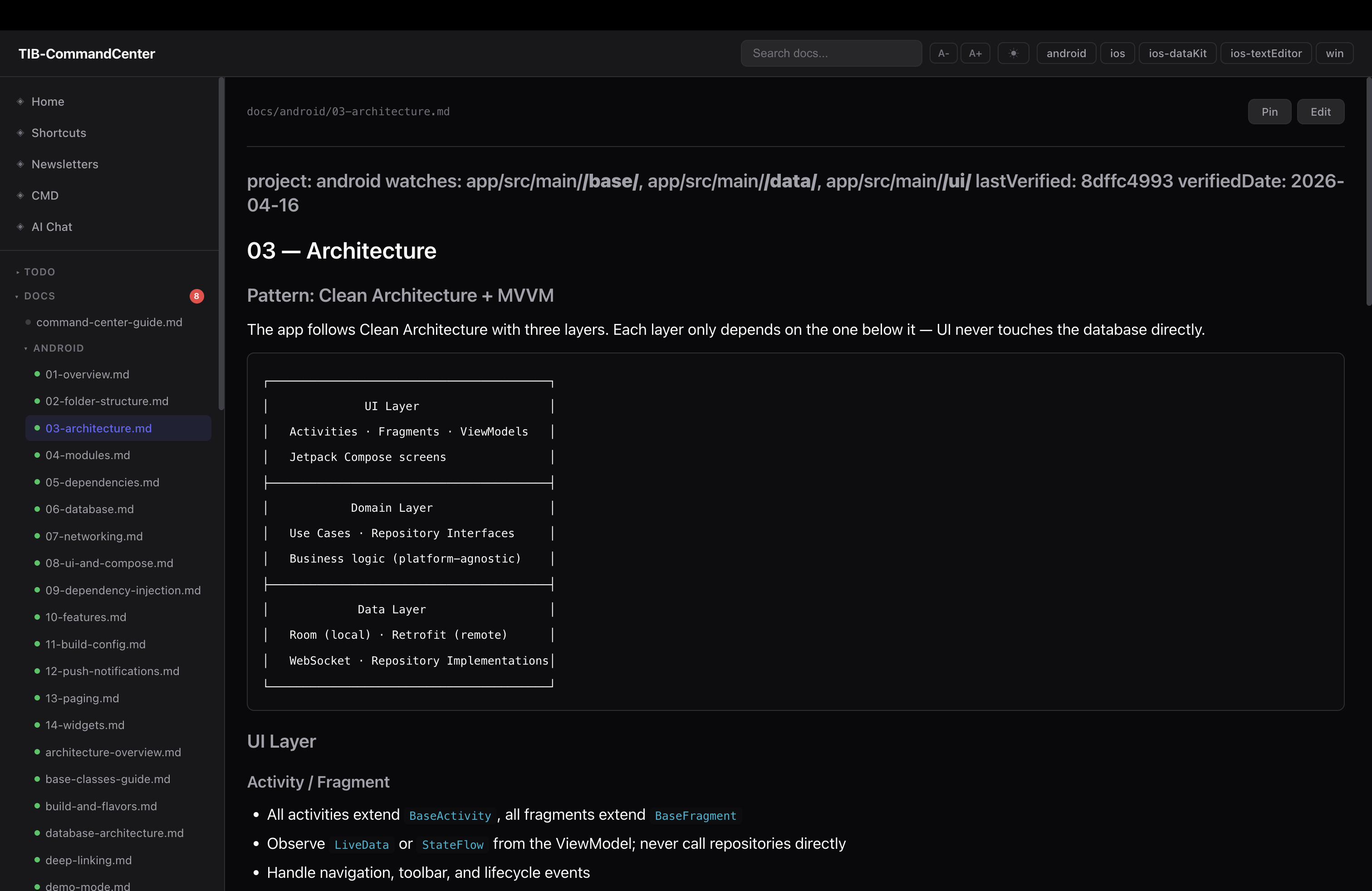
the biggest problem with docs is they go stale the moment you stop actively maintaining them. and the honest truth is most people stop maintaining them pretty quickly.
so instead of relying on discipline, i wired it into the workflow. every doc has frontmatter that declares what code it describes:
---
project: ios
watches: ios/Features/Inbox/**, ios/Core/Network/**
lastVerified: a3f9c12
verifiedDate: 2026-04-20
---
watches is a glob pattern over source paths. lastVerified is the git commit hash when i last checked this doc.
doc_sync.js runs at session start: diffs lastVerified against HEAD per project, filtered by watches. if watched files changed, the doc is flagged stale. you get a list of exactly which docs need attention — not all of them, just the ones where the underlying code actually changed.
the workflow: read the diff, update the doc if needed, run --mark-current to stamp it with the new HEAD. stale docs are a session-start action item, not a quarterly effort.
one more thing worth building: a doc_sync_prompt.md template. when doc_sync.js flags a doc as stale, you need to give Claude a consistent prompt for reviewing it. the template fills in {{DOC_PATH}}, {{GIT_DIFF_STAT}}, {{CHANGED_FILES}}, and {{DOC_CONTENT}} — Claude reads the diff, decides what changed, updates only what is wrong or outdated, and preserves the frontmatter format. without a template you end up writing a different prompt every time and the quality of the review varies. one template file in scripts/, referenced whenever /sync runs.
Task management across platforms
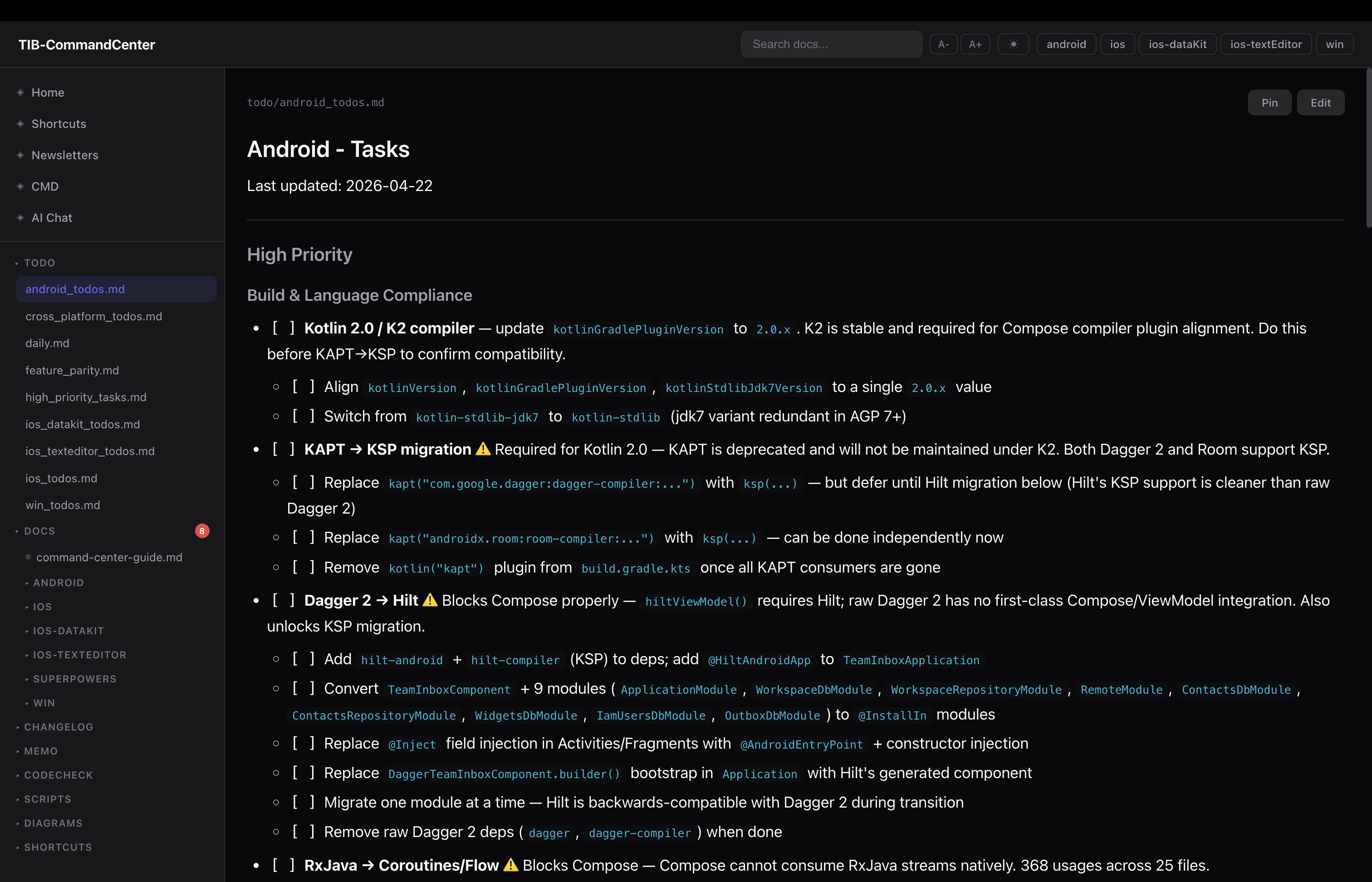
one file per platform. ios_todos.md, android_todos.md, win_todos.md. same structure in all of them:
## High Priority
- [ ] Fix session ID bug in TIBConverseInteractor.swift:83

## Medium Priority
- [ ] Add unit test target

## Low Priority
- [ ] Refactor legacy auth flow

## Completed
- [x] 2026-04-20 — Migrated Localizable strings
there is also daily.md — today’s focus, separate from the long-running backlogs. daily_reset.sh resets it each morning, carries over anything incomplete from yesterday, and pulls the top items from each project’s High Priority section so you are never starting from blank. at end of day you move done items back to the project file and carry over the rest.
it is not rocket science but it works because everything is in one place and Claude can read all of it directly — no context switching, no “go check Linear”, no copy-pasting.
Memos, KT notes, and changelogs
these three are the most underrated parts of the system. they get skipped when people think about “what does an AI need to know” but they are exactly what the AI is missing when it gives you advice that misses context.
Memos (memo/) are for anything that does not fit in a doc or a todo. decision logs, architecture choices, research, migration plans, meeting outputs. the key thing about a memo is it captures the why. a doc says “the auth middleware works like this”. a memo says “we rewrote the auth middleware because legal flagged the session token storage in April”. without the memo Claude treats every piece of code as a deliberate, still-valid decision. with the memo it knows what is intentional and what is technical debt inherited from a compliance scramble.
KT notes (memo/kt/<platform>/YYYY-MM-DD_topic.md) are specifically for inheriting a codebase. when someone does a knowledge transfer session, you write it up here. when you figure out something non-obvious about how the code works, you write it up here. these are the things that would take a new person weeks to discover by reading code — undocumented conventions, “we don’t touch that file because”, quirks of the build system, context behind a weird architectural choice. writing them down once means Claude knows them forever.
Changelogs (changelog/<project>.md) are append-only per-project ship logs:
| 2026-04-15 | Migrated inbox to VIPER          | PR #441 |
| 2026-04-08 | Upgraded to AGP 8.3              | PR #438 |
| 2026-03-22 | Added push notification handling | PR #421 |
one row per notable change. the practical use: “did we ship X on all platforms yet?” — you check the changelog instead of grepping git history across five repos. also useful at standup when someone asks what shipped last week.
The local web dashboard
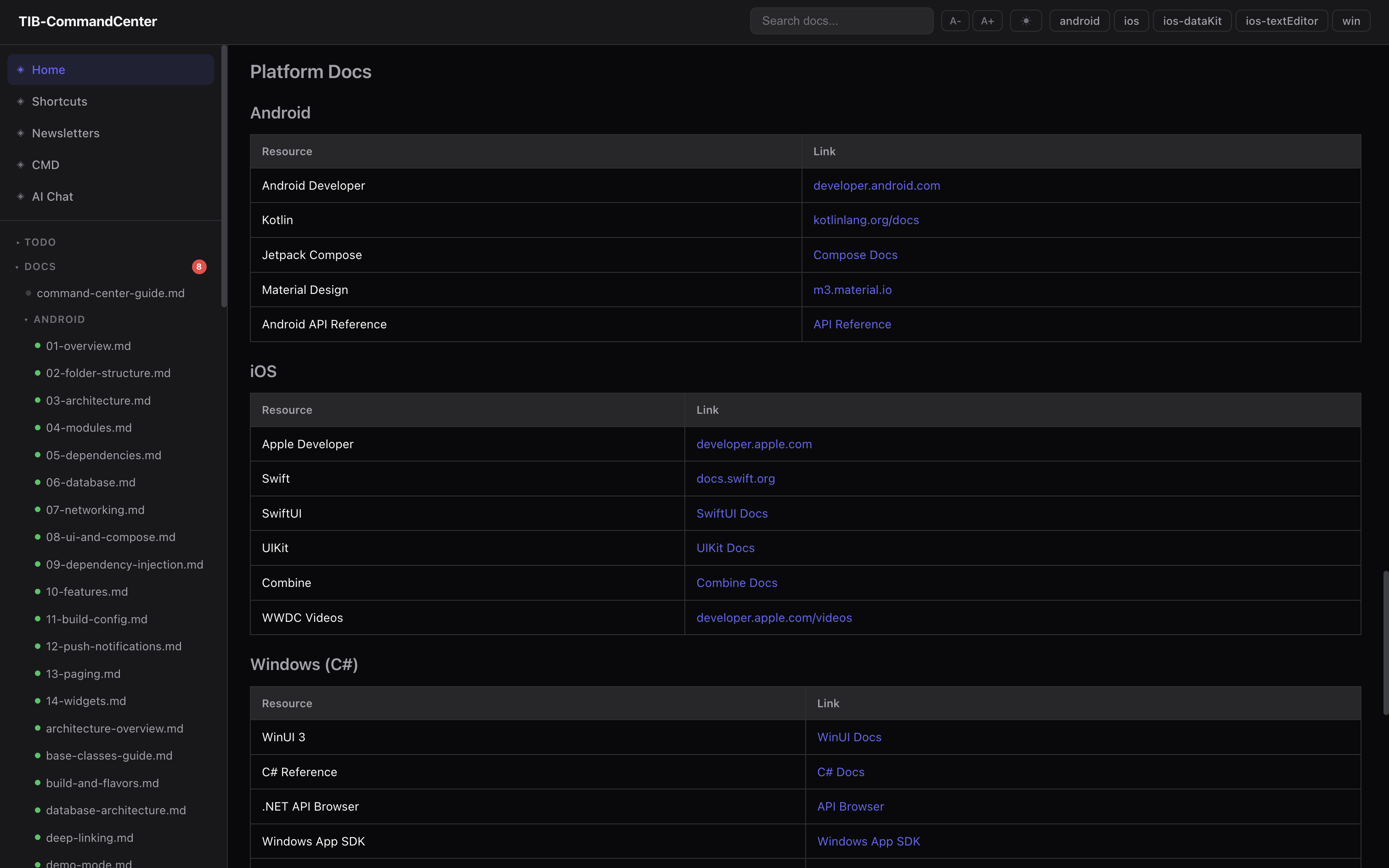
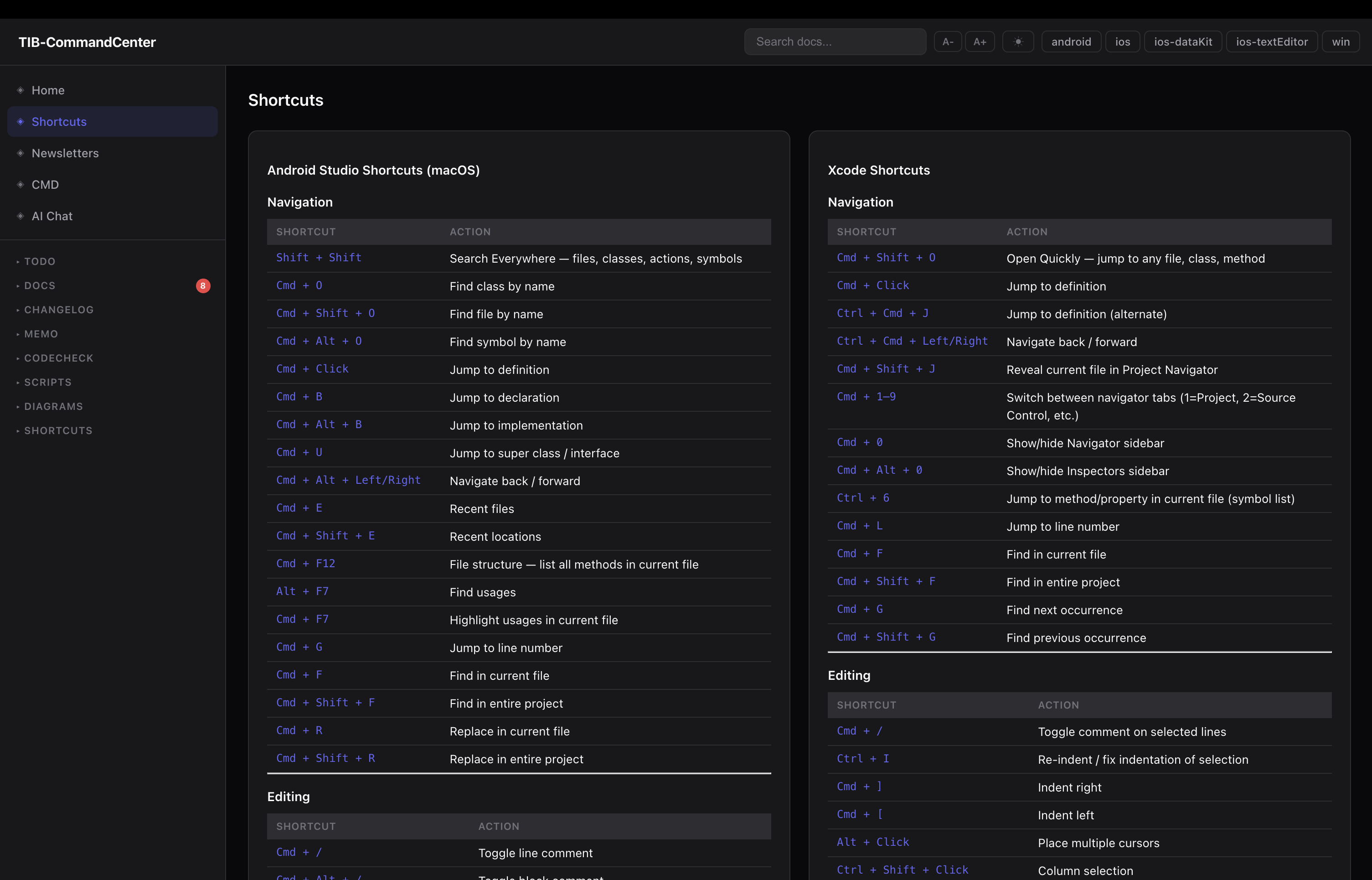
the dashboard is a local Node.js server. no framework, no build step, runs offline, starts in two seconds.
node .ops/dashboard/server.js
# opens at localhost:3000
File browser — tree sidebar over all docs, todos, memos. files render as Markdown. todo files have live checkboxes — clicking one calls POST /api/toggle and writes the change directly to disk.
Git status panel — polls all repos in parallel. branch, last commit, time ago, dirty file count.
Full-text search — index built at startup from every .md, .txt, .sh file. AND-matched with scoring. returns results with line-number snippets. useful when you remember something exists but can not remember which doc it is in.
Doc staleness indicators — green/yellow/red dots next to each doc in the sidebar based on doc_sync.js output. a resync button re-runs the script and refreshes the cache.
Task creation — a form on every page to add a todo at any priority level to any project. finds the right heading and inserts the item, updates the Last updated: stamp.
Shape it to your problems — the CMD tabs and RSS feeds
here is the thing: everyone’s pain is different. the folder structure and scripts above are the common base. but the reason this actually works day-to-day is that you can add whatever else you actually need on top.
for me, the two things i added that made the biggest difference:
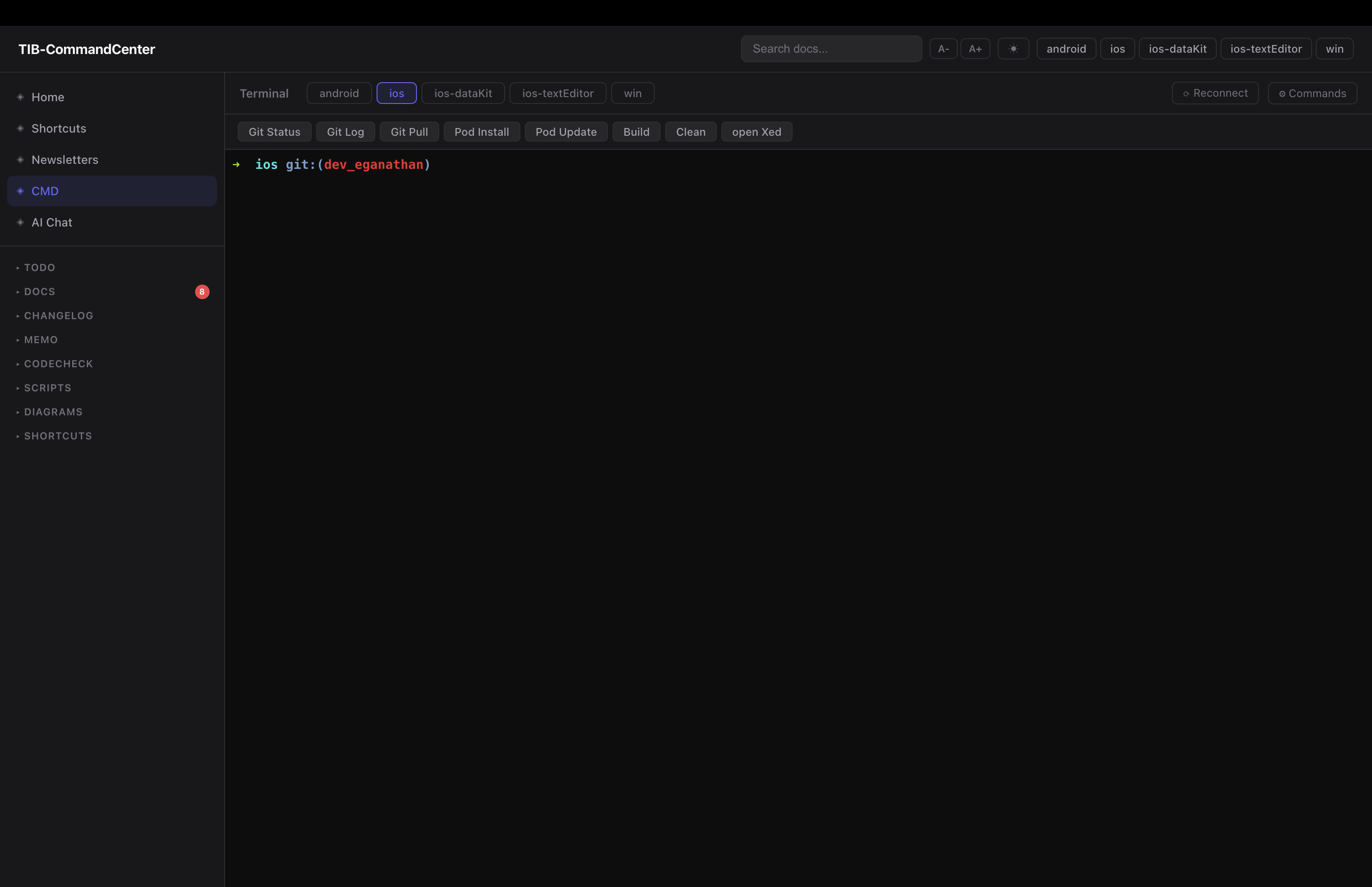
CMD view — xterm.js + node-pty over WebSocket. a real terminal embedded in the browser, one tab per project. each tab opens a PTY session in that project’s directory. per-project quick-command buttons — you configure a label and a shell command, they appear as buttons above the terminal. so Build Debug runs ./gradlew assembleDebug in the Android tab. Sync Pods runs pod install in the iOS tab. i click once, watch it run. no switching windows, no remembering the exact command flags.
before this i was constantly switching terminal windows and losing track of which one was which. now everything is in one browser tab.
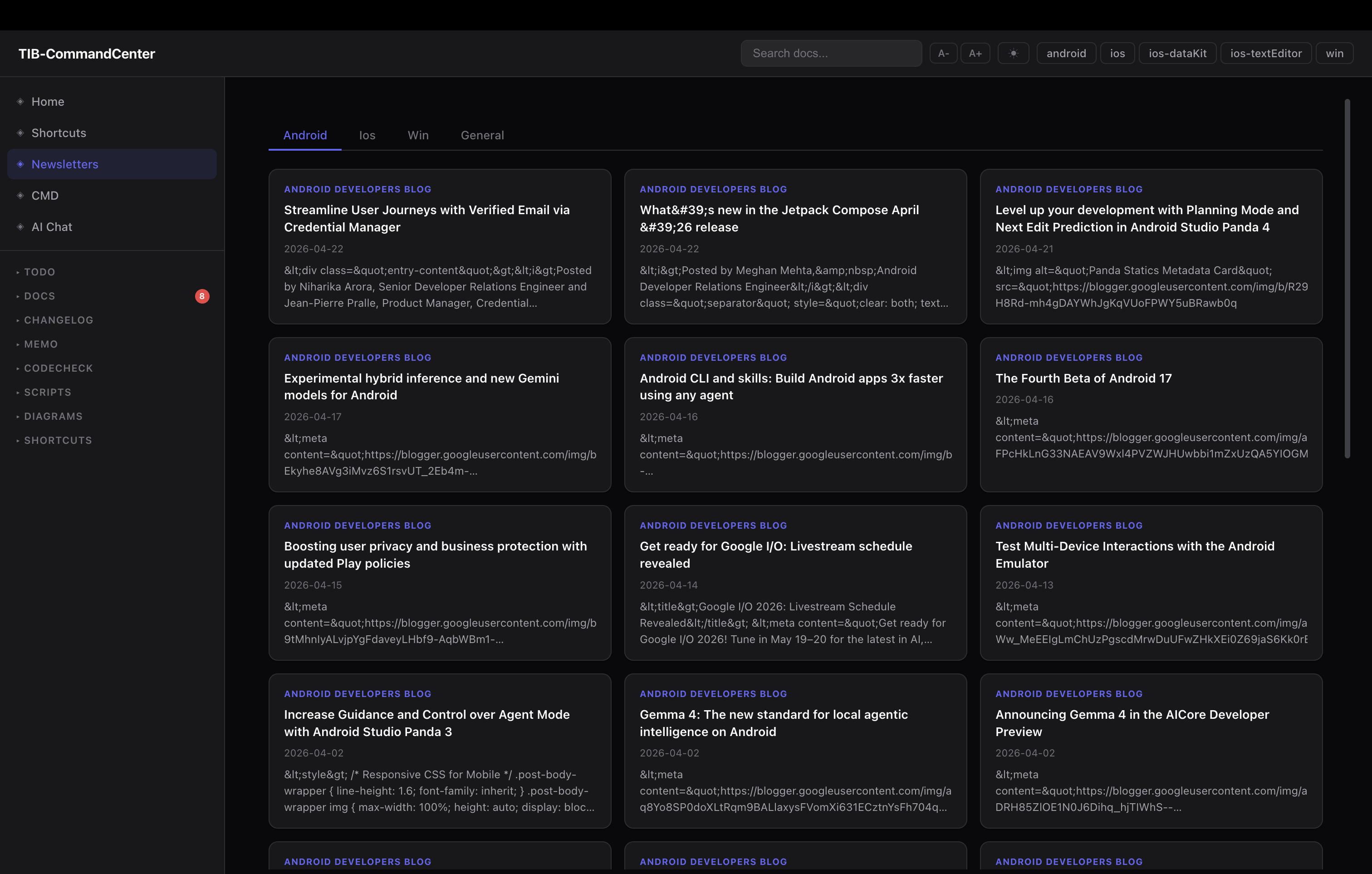
RSS feeds / newsletters — each platform has its own dev newsletter and release channel. iOS dev forum, Android releases, Kotlin blog. i added an RSS tab. feed URLs live in a feeds.json file, keyed by platform:
{
  "ios": [
    { "label": "iOS Dev Weekly", "url": "https://iosdevweekly.com/issues.rss" },
    { "label": "Swift Blog", "url": "https://swift.org/atom.xml" }
  ],
  "android": [
    { "label": "Android Developers Blog", "url": "https://feeds.feedburner.com/blogspot/hsDu" }
  ]
}
the server fetches them server-side (handles redirects, CDATA stripping), renders as cards per platform. i stop by when i want to catch up. no separate app, no subscriptions, no algorithm deciding what i see — just the feeds i actually want, inside the same tab i already have open.
neither of these exist in anyone else’s command center because they are solving my specific workflow pain. the point is the base layer gives you the foundation. the top layer is yours to build.
other ideas i have seen or thought about that i haven’t built yet: a meeting notes tab that auto-stamps today’s date, a platform-specific analytics panel, a PR review queue for when you work with a team.
The two-tier AI model
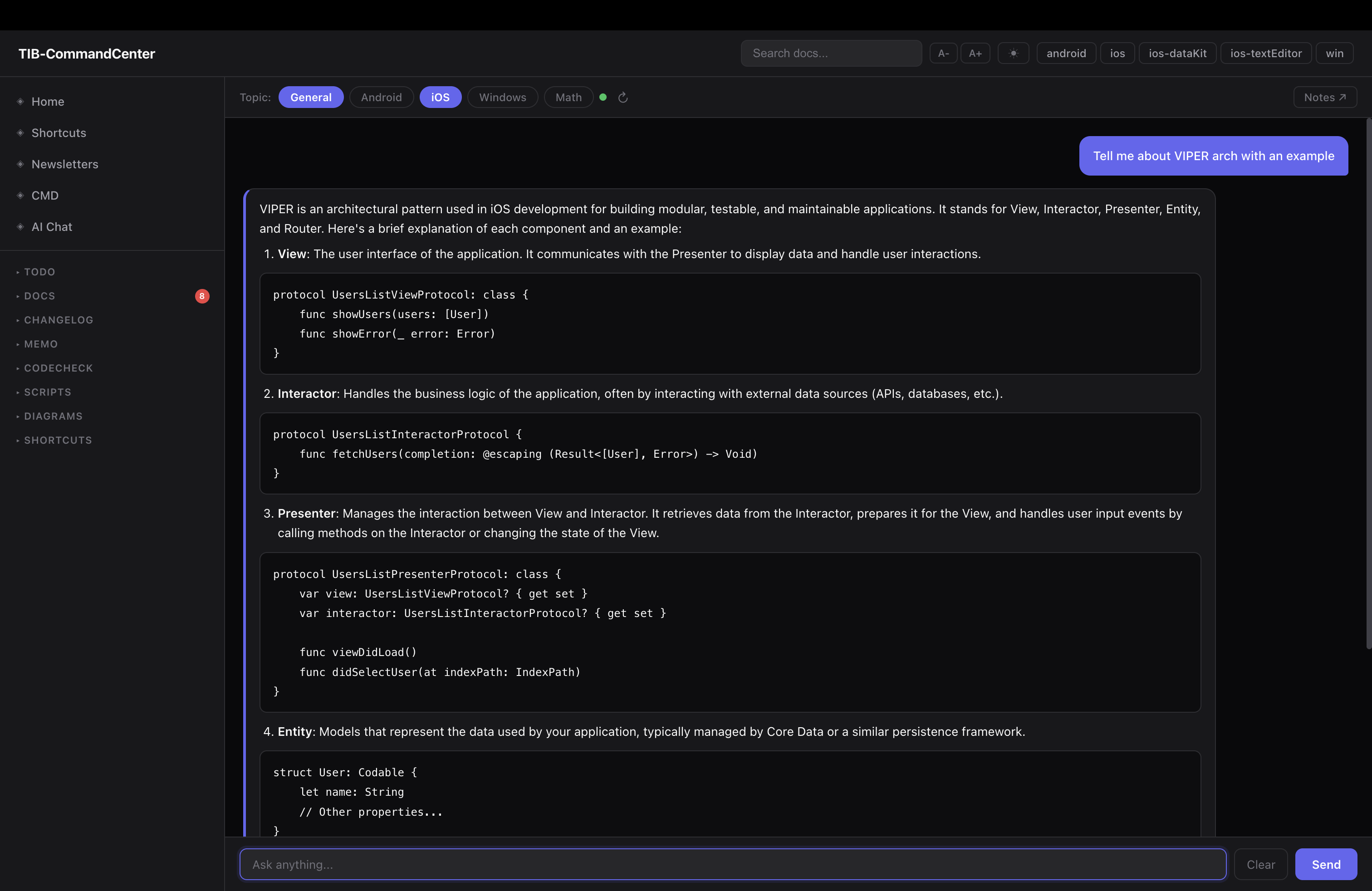
the local web dashboard has a built-in AI chat powered by Mistral 7B via Ollama — not Claude. this is the layer that routes cheap questions away from the cloud.
the RAG pipeline:
question
   │
   ▼
embed ──► LanceDB vector search ──► top-k doc chunks
                                          │
                                          ▼
                             Mistral 7B ◄── context + question
                                          │
                                          ▼
                                    streamed answer
                               (with source file citations)
at startup the server walks all docs, chunks them, embeds them and stores the index in LanceDB. conversation history (last 12 turns) is passed with each request. topics can be filtered per platform.
but here is the part that matters more — the local model is also wired directly into Claude as an MCP tool. not just the dashboard chat, but Claude itself can call it:
search_docs(query, project?)  — semantic search over the LanceDB index
ask_local(question, project?) — full RAG query to Mistral 7B
so when you ask Claude “where is the WebSocket manager?” Claude does not think about it, does not run three tool calls, does not burn tokens. it calls ask_local, gets the answer back from the local model as a tool response, and continues. the routing decision is encoded in CLAUDE.md as explicit rules so it happens automatically:
You
 │
 ├── Complex reasoning ──────────────────► Claude (API tokens)
 │    debugging, architecture,
 │    multi-file refactoring, codegen
 │
 └── Lookups + summaries ──► local MCP ──► Mistral 7B (free, local)
      "where is X?", todos,
      file summaries, templates
questions that go local: “where is ClassName defined”, “what files are in folder X”, “summarise this file”, “what todos are open for Android”, “what is the VIPER template for a new scene”, anything answerable by reading the existing docs.
questions that use Claude: multi-file refactoring, debugging across call chains, cross-platform analysis with real reasoning, writing new features.
in practice around 60–70% of session queries route to the local model. those run free on my machine. Claude gets the work that actually needs it.
Tracking what you saved
there is one more hook worth adding: a PostToolUse hook on the local MCP calls. every time Claude calls ask_local or search_docs, a small Python script logs the call to a token_savings.jsonl file with a timestamp, the tool used, and an estimated token count saved:
{"ts": "2026-04-26T10:32:11", "tool": "ask_local",    "estTokensSaved": 400}
{"ts": "2026-04-26T10:33:45", "tool": "search_docs",  "estTokensSaved": 250}
the same hook also outputs a reminder back into Claude’s context: “you just used the local model — append [tib-mcp-info] to the sentence in your response that came from this result.”
that [tib-mcp-info] tag in the response is how you know which parts Claude answered from local knowledge vs the local model. it is easy to skip but worth keeping — after a few weeks you can look at the JSONL and get a rough sense of how many tokens the routing saved. it also keeps you honest about whether the local model is actually being used or whether Claude is quietly doing everything itself.
The session cache — picking up exactly where you left off
the session briefing knows “what was worked on last session” because /callitaday writes a session_summary.json at the end of each day. the structure:
{
  "date": "2026-04-22",
  "platform": "ios",
  "done": [
    "Settings flatten complete — SettingsSUI/NewUI/Settings_base merged into Features/Settings",
    "Helpers restructured — Contacts moved to Features/Contacts"
  ],
  "carriedOver": [
    "Android: edge to edge mandate for Play Store — not checked yet"
  ],
  "decisions": [
    "Contacts gets Features/Contacts/ not buried in Helpers",
    "URLSchemeAnalyser lives in Core/DeepLinker/"
  ],
  "openQuestions": [
    "CustomContextMenu still needs to move to Features/Inbox/Actions/"
  ],
  "keyFiles": [
    "native/TeamInbox.xcodeproj/project.pbxproj",
    "native/TeamInbox/Features/Settings/"
  ]
}
next morning, session_context.sh reads this file and includes the done, carriedOver, decisions, and openQuestions fields in the briefing. Claude starts the session knowing exactly where things were left — no re-reading git log, no “what were we working on?”. the keyFiles field is useful if you want Claude to immediately orient to the relevant parts of the code.
/callitaday is the slash command that writes this. it wraps the session: moves done items from daily.md back to the project todo files, carries over incomplete items, writes the JSON. it is the last thing you run before closing the terminal.
Setting this up yourself
the minimum version of this is five files and an afternoon:
- create a parent workspace folder above all your repos
- add a
.ops/folder withdocs/,todo/,memo/,scripts/ - write a
CLAUDE.mdat the workspace root — folder layout, git command prefixes, working conventions, routing rules - write
session_context.shor a simple briefing script that runsgit -C <project>/ statusacross all repos and prints a summary — hook it to session start - write one doc per project covering the folder structure and architecture, add the
watchesfrontmatter
that is the base. that alone kills the “re-explain everything every session” problem and the “docs live in Notion somewhere” problem.
layer on top in order of payoff:
daily_reset.shand thedaily.mdworkflow — probably adds the most to day-to-day sanitydoc_sync.js— if you are writing docs and want them to stay honest- the dashboard — once you want a visual layer over all of it
- the CMD tabs — if you are constantly switching terminal windows for the same commands
- the local model + MCP — when token pressure is real and your doc library is large enough to justify a RAG pipeline
do not build all of it at once. start with the folder structure and the CLAUDE.md. add the rest as you actually feel the pain they solve.
What changed
before: open the right repo in Xcode, find the right Notion page, check Slack for where i left off, re-explain the codebase to Claude, watch the first 30% of my context window fill with boilerplate before writing a single line of actual code.
after: one terminal, one browser tab, one Claude session. the Command Center has the state of every repo, every doc, every task, every recent decision — and the cheap questions never reach the cloud.
the whole system is about 1,500 lines of Node.js, a handful of shell scripts, and Markdown files. no heavy dependencies, no cloud services, runs entirely offline.
if you are managing more than two active repos and you are constantly re-orienting your AI every session — this pattern is worth trying. you do not have to build the whole thing. start with the folder structure and a CLAUDE.md. that alone will change how your sessions feel.
the rest you will figure out as you go, shaped around whatever is actually slowing you down. that is the point.
a note on this post — the ideas, the frustration, the architecture, the decisions are all mine. i used Claude to help structure and articulate things i already knew but was too lazy to write out properly. felt right to mention it given the whole post is about working with AI. use your tools.
after writing this i came across andrej karpathy’s wiki pattern — same instinct around plain files, single source of truth, readable by humans and machines. worth looking up if this resonated.